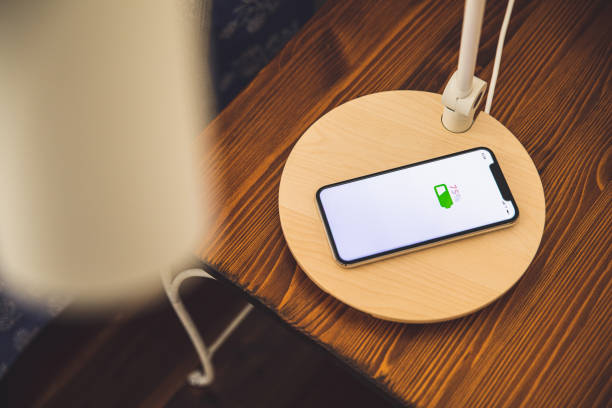
Wireless charging has changed the way people power their devices, and invisible under-desk chargers take that convenience even further. These innovative chargers hide beneath desks, tables, and countertops, offering a clean and modern way to charge your phone. With no visible pads or cables, you get a seamless charging experience built directly into your furniture.
This guide explains exactly how invisible chargers work, what surfaces they need, how safe they are, and when they make sense for your home or workspace.
What Makes an Invisible Wireless Charger Invisible?
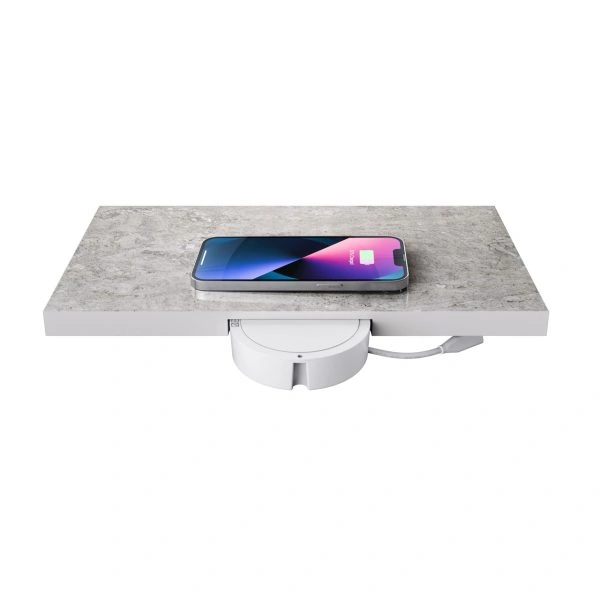
Invisible wireless chargers stay completely hidden under your desk or table while still delivering power through the surface. This allows users to enjoy wireless charging without adding clutter or visible electronics to their space. The result is a cleaner, more stylish environment where technology blends naturally into the furniture.
This section explains how these chargers attach under surfaces and why homeowners prefer such a clean approach.
How hidden wireless chargers mount underneath desks and tables
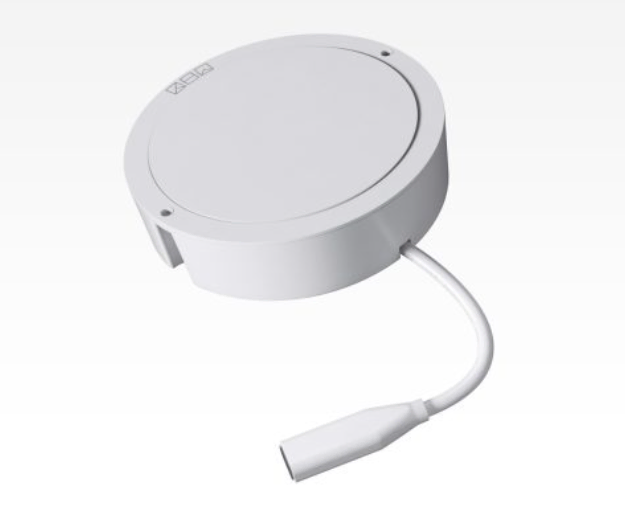
Invisible chargers attach to the underside of surfaces using adhesive, screws, or brackets. The unit stays out of sight, while wireless power travels upward through the tabletop. This keeps the furniture surface neat and free of visible hardware.
Differences between surface-mounted pads vs under-surface solutions
Surface-mounted pads sit on top of the desk and remain visible at all times. Under-surface solutions hide the entire charging module underneath the table, leaving nothing exposed. You simply place your phone in the marked zone on the surface to start charging.
Why homeowners prefer cord-free charging setups
People enjoy the simplicity and elegance of cord-free setups. Without visible pads or cables, the space looks cleaner and more organized. It also reduces the wear and tear that comes from constantly plugging in charging cables.
Applications: desks, kitchen counters, nightstands, shared spaces
Invisible chargers fit well in a wide range of environments. They can be installed under work desks, kitchen islands, nightstands, and shared meeting tables. They offer a smooth blend of convenience and style wherever people frequently place their phones.
The Technology Behind Under-Desk Wireless Charging
Invisible under desk wireless charging rely on the same core principles as standard wireless chargers, but with added technology that boosts range and stability. These chargers are designed to work through a variety of materials while maintaining good power transfer. Understanding this technology helps explain how charging works even when the device is hidden.
Below, we explore the science behind inductive power and the systems that make invisible charging possible.
Basics of inductive charging and magnetic resonance
Inductive charging uses coils in the charger to create a magnetic field. When your phone is placed above the charging zone, its internal coil picks up that energy and converts it into power. Some advanced models use magnetic resonance, which allows charging at slightly greater distances.
How power transfers through non-metallic surfaces
Energy passes through materials like wood, stone, or quartz without weakening. Because these materials do not block magnetic fields, they allow smooth power transfer from the hidden charger to your phone on the surface.
Role of Intelligent Power Communication in distance charging
Intelligent Power Communication helps the charger and phone exchange signals to optimize power delivery and communicates safety protocols like foreign object detection, over current signals and fast charging protocols. This ensures efficient and safe charging, even when the distance between the charger and the phone varies based on surface thickness.
How devices maintain charging alignment without visible pads
Manufacturers provide alignment stickers or guides that mark the charging spot on the surface. Some chargers also offer feedback when the phone is correctly positioned, making it easy to align even without seeing the device underneath.
Charging distance range
Most invisible chargers work through surfaces ranging from 0.39 inches to over 1 inch thick. The exact range depends on the model and the power output, but generally speaking, greater ranges create efficiency losses that reduce charging performances. For thicker surfaces, a recessed area may be needed under the table to bring the charger closer to the phone Kew Labs chargers are optimized to between 0.33-0.5” to ensure a safe and efficient performance.
Surface and Material Requirements for Optimal Performance
Invisible chargers are designed to work through specific types of materials. Choosing the right surface ensures smooth and efficient charging. Non-metallic surfaces are essential, as metal blocks the energy transfer needed for wireless charging
This section helps you identify what surfaces work best and what factors affect performance.
Compatible materials: wood, quartz, granite, marble, engineered stone
Materials such as solid wood, plywood, quartz, granite, marble, and engineered stone allow magnetic signals to pass through. These surfaces make ideal installation points for invisible chargers.
Importance of non-metallic surfaces
Metal blocks magnetic energy and stops wireless charging completely. Even surfaces with hidden metal layers can interfere with performance. Always choose non-metallic materials for best results and in the example of surfaces like natural stone that can have variations between batches, we recommend running a small test piece as there can be metallic elements in stone that aren’t man made
Recommended surface thickness for reliable charging
Surfaces should ideally be between 8 and 12 millimeters. Thicker surfaces may need a recessed underside to reduce the distance between the charger and the phone for stronger power transfer.
Factors that reduce charging efficiency
Thick surfaces, poor alignment, metal objects on the surface, or very thick phone cases can lower charging performance. Keeping the charging zone clear and properly marked solves most issues.
How to test surface thickness before installation
Use a ruler or caliper to measure the thickness of your desk or countertop. Many manufacturers also include testing templates to confirm whether your installation surface is suitable.
Safety Considerations: Is Under-Desk Wireless Charging Safe?
Invisible under-desk chargers include multiple safety features designed to prevent overheating, interference, or electrical issues. These built-in systems ensure that hidden charging remains safe for both the furniture and your device.
Here, we cover the main safety components found in quality wireless chargers.
Heat management and smart temperature regulation
Advanced chargers monitor temperature during use and reduce power when they detect heat buildup. This prevents overheating and protects your phone’s battery health and is exactly what Intelligent Power Communication does in Kew Labs chargers
Foreign object detection
Foreign object detection (FOD) stops the charger if metal items are placed over the charging zone. This prevents accidental heating of objects like keys or coins. Chargers require FOD tuning for the distance they are being installed at. Standard surface based wireless chargers have FOD steps that are designed to operate at set distances. For invisible chargers with variable charging distances, custom FOD tuning is required which is not typically done on most off the shelf solutions. Kew Labs chargers have FOD specifically customised to function at the 8-12mm charging range.
EMF levels and regulatory compliance
Invisible chargers produce very low electromagnetic fields and follow international safety guidelines. They are safe to use around electronics, furniture, and people.
Safety certifications
Products with Qi, FCC, and CE certifications have passed strict safety and reliability tests. These certifications help confirm the charger’s quality and performance.
Avoiding metal obstructions and interference
Keeping metal items away from the charging zone ensures smooth power transfer. Even small metal objects can trigger safety features and stop charging.
Real-world testing from trusted brands
High-quality brands test their chargers across many materials and thickness levels to ensure reliable, long-term performance under real conditions.
Pros and Cons of a Wireless Charger Under Your Desk
Pros
- Clean, cable-free workspace
Invisible chargers eliminate visible cords and charging bricks, giving a tidy and minimal look to desks, tables, or countertops. - Longer device lifespan (no repeated cable plugging)
Because you no longer need to plug and unplug charging cables, you reduce wear on charging ports. The phone’s battery also benefits from the smoother power delivery of wireless charging. - Aesthetic and functional upgrade
Embedding a charger beneath a surface preserves the visual integrity of furniture. You get a modern, integrated charging solution that does not disrupt design or décor. - Works with cases (depending on thickness)
Many phones can be charged through standard cases, so you don’t need to remove them every time you charge as long as the case is not too thick or metallic.
Cons
- Requires compatible surface materials
Surfaces must be non-metallic and within certain thickness limits. Not all desks or tables qualify without modification. - Slightly slower than wired fast-charging
Wireless charging, especially through a surface, may deliver lower wattage compared to direct wired fast charging. This means charging may take a bit longer. - Installation precision is important
Placement and alignment matter more than with a visible pad. Poor installation or a surface that is too thick can lead to unreliable charging.
Installation Basics and What Homeowners Should Know
Installing an invisible wireless charger is simple with the right steps and preparation. Choosing a compatible surface and following proper alignment makes the charging experience smooth and reliable.
This section guides you through the essentials for a successful setup.
Choosing a desk or table surface
Choose a non-metallic desk or table within the recommended thickness range. The material should allow magnetic signals to pass through easily or if you’re working on a new project, ensure your fabricator or contractor has created a pocket at the right thickness for your invisible wireless charger to be installed
Tools required
You may need adhesive tape, screws, brackets, and basic measuring tools. Most kits include helpful installation accessories.
Step-by-step setup process
- Measure the surface to confirm compatibility.
- Mark the mounting spot on the underside.
- Install the charger with adhesive or screws.
- Place the alignment sticker on the top surface after calibrating the alignment
- Test the charging zone with your phone.
How to align your phone for charging accuracy
Use the alignment sticker to position your phone correctly. Some chargers also provide audio or light feedback when alignment is correct.
Using markers or alignment stickers
Alignment stickers show the exact charging zone and help users place their phone precisely without guessing.
Troubleshooting common issues
Check alignment, remove metallic cases, and ensure the surface is not too thick. Most charging issues disappear once the phone is placed correctly.
When Should You Choose an Invisible Wireless Charger?
Invisible chargers are ideal for people who want a clean and modern environment without visible accessories. They suit minimal setups, shared spaces, and places where cords can be inconvenient. This is where Kew Labs invisible wireless charging solutions fit perfectly, offering a clean look without sacrificing performance.
They are best used in homes, offices, kitchens, entry tables, and bedside areas. However, they are not ideal for metal desks or extremely thick countertops unless modified.
Conclusion
Invisible under-desk wireless chargers combine convenience, safety, and modern design in a single solution. They provide a clean workspace free of cables and clutter, using advanced inductive technology to charge your phone through compatible surfaces. When installed correctly on non-metallic materials and within the recommended distance, these chargers deliver safe, reliable, and efficient performance. They are an excellent choice for homeowners who want to upgrade their environment with a seamless and stylish charging experience, Contact us.
FAQs About Invisible Under-Desk Wireless Charging
1. Do invisible wireless chargers work through thick wood?
Yes, many models work through 0.39″–1.0″+ depending on design and power output. But greater distances will reduce charging performance.
2. Can it charge through metal surfaces?
No. Metal blocks inductive charging and causes interference.
3. Is it safe to charge under surfaces near electronics?
Yes, with proper placement and certified chargers that include heat + FOD protection.
4. Does it work with phone cases?
Most standard cases are fine; extremely thick or metal cases may reduce performance.
5. Will it heat my phone?
Minimal heat is normal; overheating is prevented by built-in safety sensors.
6. Do different materials make a difference to the thickness
No – There is no noticeable different between materials depending on their density. We see materials with good heat dissipation like stone performing well.